Gate attendance checking

Gate attendance checking

par André Camacho,
Nombre de réponses : 9

Hello everyone,

I am writing here to talk to you about a need in our institution that drove me to build a moodle plugin as i did not find anything that would offer this feature.

The plugin addresses this use case :

  • You are doing a computer based exam in an exam room
  • You need to quickly verify students physically present in the exam room (and maybe do others checks like : identity, paper notes submitted to invigilators, etc.)
  • You want to restrict quiz access to users that have submitted to user verification process

It allows in a moodle activity to :

  • Filter students showing in the table
  • Create custom steps for other verifications needed
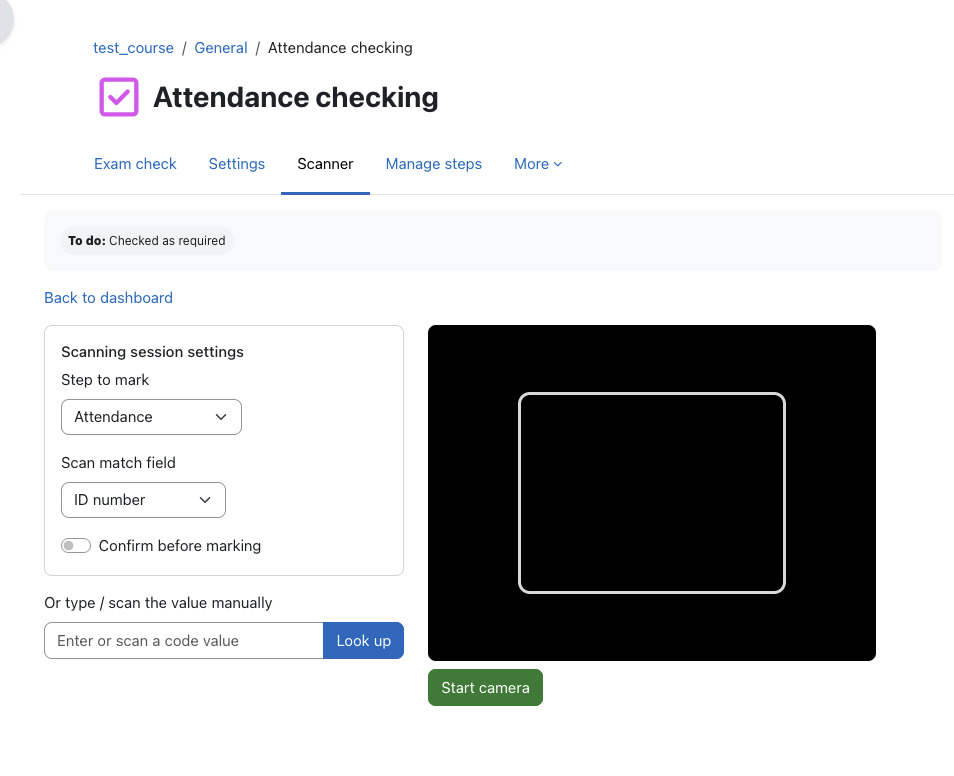
  • Check students by clicking in the table or using a scanner. Should allow multiple teachers to scan students at different doors at same time (live refresh and filtering)
  • Scanner can use webcam or phone camera to scan QR Codes or 1D Codes (barcodes)
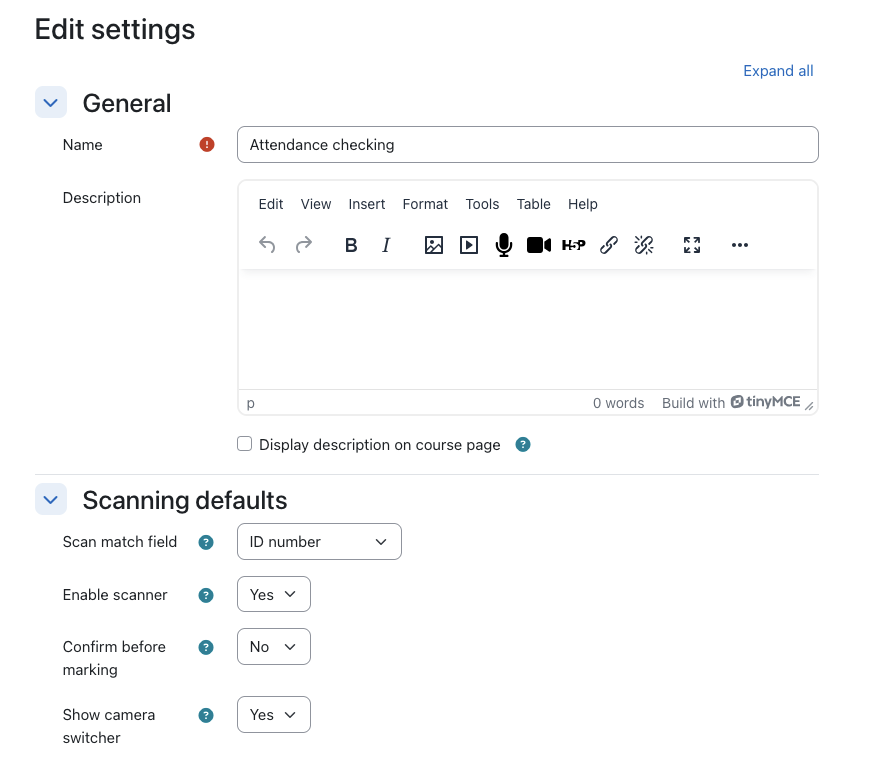
  • Scanner checks in a student for a specific step and looking in a specific user_profile field
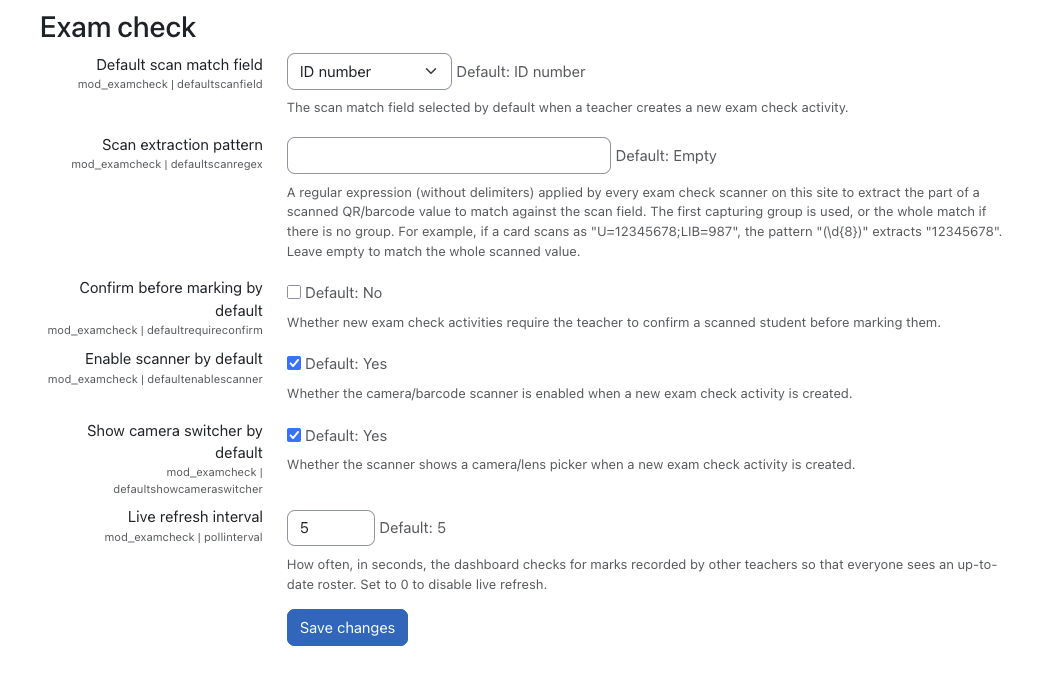
  • Global setting : scanner_regex allows to extract value from qrcode/barcode value

Here are some screenshots of the first version of the plugin I have.
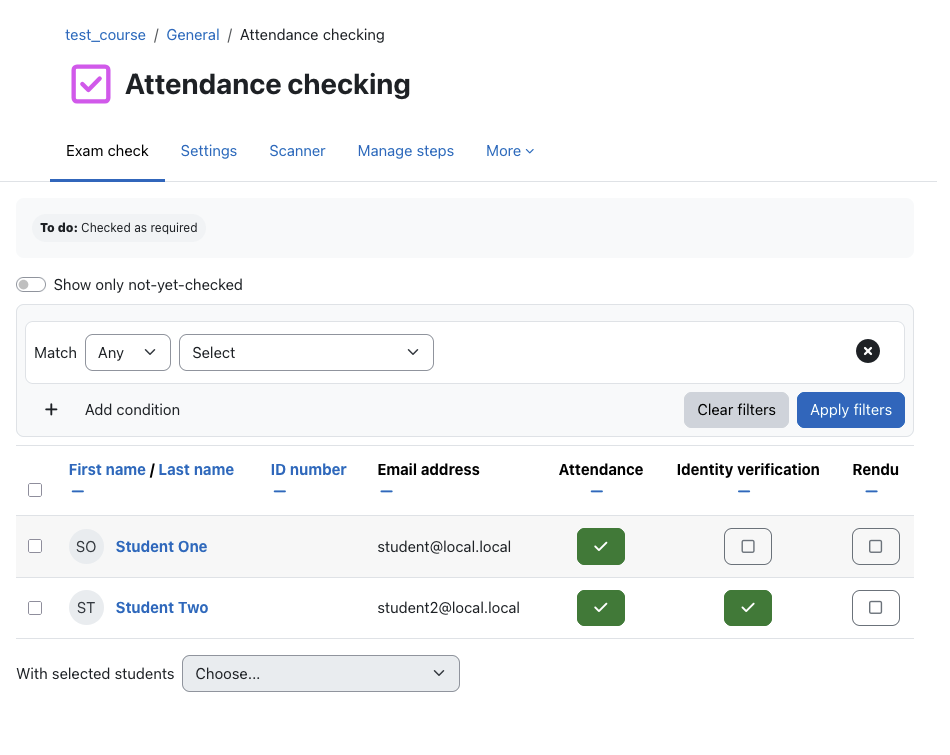
participants

scanner

settings

global-settings

Let me know if that is something that would be useful for you and if you think an existing plugin already addresses all of part of this usecase.

If I do publish this plugin i would be looking for co-authors if someone is interested in sharing the future work sourire

Thank you very much.
André Camacho

En réponse à André Camacho

Re: Gate attendance checking

par Andreas Steiger,
Oh, exam attendance is currently a big manual struggle for my crew, and I think something like that could improve the situation a lot!
En réponse à André Camacho

Re: Gate attendance checking

par George Ionita,

Hello André,

I really like your idea.

As a Digital Teaching Specialist at ETH, I know that academic integrity and cheating are major concerns among lecturers who use digital assessments. If possible, I would be happy to connect you with one or two of them, as they have a comprehensive understanding of the relevant use cases. Perhaps you could even give them a demo.

Unfortunately, I'm not a programmer myself, but I'd be happy to help with testing the plugin. Just let me know how I can assist.

Thanks,

George

En réponse à André Camacho

Re: Gate attendance checking

par Michael Hughes,
This sounds interesting.

Were you thinking that once this plugin "scans" their presence, it would be via completion API to unlock the related activities (ie. "check-in activity was completed"), or via custom availability plugin to do that, as I think the missing part is the interactive bit you've highlighted and integrates nicely into those existing Moodle sub-systems.
En réponse à Michael Hughes

Re: Gate attendance checking

par André Camacho,
I was thinking to use activity completion.
Teacher chooses which set makes activity complete for student X (ex: identity check).
Then in quiz activity, "access restriction" is made using "activity completion" of this plugin.

That way, any student that has it's set "identity check" checked, has access to the quiz activity.

This solves an issue where 140 students can participate potentially, but only 100 pass the door so we want to easily be able to restrict quiz access to this 100.
En réponse à André Camacho

Re: Gate attendance checking

par André Camacho,
EDIT : Another feature we would like to introduce, addresses the following use-case : "When doing a SEB based exam (BYOD mainly), how to make sure the student submitted his copy when he tries to leave the room ?". Today only a manual check allows that, which is difficult for large cohorts exams.

The idea would be to have a "submission status check" feature that would allow teacher to : scan student card OR check student in a specific set ("submitted copy").
When scanning or checking student, a message appears on screen. Either :
- Student has submitted his quiz attempt, green color, marked as submitted => he can leave the room
- Student has been detected has not having submitted quiz yet, red color, not marked as submitted => invigilator can ask student to solve issue before trying to leave again

Do any of you have also a problem regarding the "leaving the room, before time, because student finished earlier".

Waiting for the time to end before allowing them to leave does not always work, as usually on a 300 students exam there are almost 50 students that have extra time and will stay in exam room later than others.
En réponse à André Camacho

Re: Gate attendance checking

par Ulrich Strauss,
I know you are going down another route, but similar-ish to the QR code or barcode on your badge, you could attach an NFC reader to the computer and have the reader read the student ID or tag ID from the badge. Most NFC readers are fast and reliable; it comes down to whether badges are already NFC-enabled and whether you can match badge IDs to student IDs. Depending on the feasibility of the whole use case, I could even see the NFC reader attached to every PC in a PC laboratory, or just have designated scanning stations at the entrance.
En réponse à Ulrich Strauss

Re: Gate attendance checking

par André Camacho,
Hi, thanks for your reply.
NFC scanning would be the next feature to be added.

One thing that would need to be checked is ability for browsers to use mobile device scanner : ideally, android and ios phones with a browser would be enough to scan NFC tags. I think this is only possible on android today.

Regarding plugging a NFC reader to the computer that would be the best solution, as would be being able to plug a barcode scanner to a computer, instead of relying on the phone camera.

In other terms, i would like to focus first on "usable with a mobile browser and moodle mobile web version" and then make it compatible with hardware scanners NFC/QR/Barcode. That is because as soon as released, first option would allow a lot of people to use it right away.

But again, thank you very much for your input.